Building Cognitive Canvas: An AI-Powered Content Management System with the Model Context Protocol
When working on projects, we read a large amount of technical material documentation, blog posts, research papers, and code examples. We often ask an LLM to explain a concept or answer a specific question, get what we need in the moment, and then close the conversation. That knowledge is rarely saved, structured, or reused, even though it was part of our learning process.
Cognitive Canvas addresses this gap by turning those one-off interactions into persistent, reusable knowledge. Instead of losing context when the chat window closes, the system allows an AI assistant to store, organize, and later retrieve what you’ve read making past learning available exactly when it’s needed.
How?
Cognitive Canvas addresses this by integrating a "second brain" directly into the AI assistant. It is a custom MCP server that allows Claude to store, categorize, and semantically search a user's reading list.
This project was built to gain hands-on experience with the Model Context Protocol (MCP). As a new standard for connecting AI models to data, the development process focused on understanding implementation details specifically how to design robust tool definitions, handle type safety between the LLM and the backend, and manage state in a stateless protocol.
Understanding the Model Context Protocol (MCP)
To understand the architecture of Cognitive Canvas, it is essential to first understand the protocol it is built upon.
What is MCP?
The Model Context Protocol (MCP) is an open standard that enables AI models to interact with external data and tools safely. Historically, connecting an LLM to a database or API required building a custom integration for that specific model. MCP eliminates this by providing a universal standard similar to how USB-C creates a standard connection for hardware devices.
Learn more about building a MCP server here.
How MCP Is Typically Used
In a standard implementation, MCP operates on a client-host-server model:
- The Host: The application the user interacts with (e.g., Claude Desktop, an IDE like Visual Studio Code).
- The Server: An application that exposes data or tools (e.g., a Google Drive connector, a Slack bot).
- The Client: The component within the host that communicates with the server.
This allows developers to write a server once (e.g., "Read my Calendar") and have it work with any AI application that supports the protocol.
How Cognitive Canvas Uses MCP
In this specific project, Cognitive Canvas functions as an MCP Server. It does not run its own LLM for the chat interface; instead, it exposes "Tools" and "Resources" to the host (Claude or Copilot).
- Tool Exposure: The server broadcasts a list of available tools
store_content,query_content, andgenerate_quizto the AI client. - Execution: When the user asks the AI to "save this link," the AI client sends a request to the Cognitive Canvas server to execute the specific Python logic associated with that tool.
- Context Injection: The server processes the request and returns the result (e.g., a success message or search results) back to the AI context window, allowing the conversation to continue seamlessly.
High-Level Architecture
The system follows a layered architecture to separate the protocol logic from the business logic. This ensures the core services remain testable and independent of the specific AI interface.
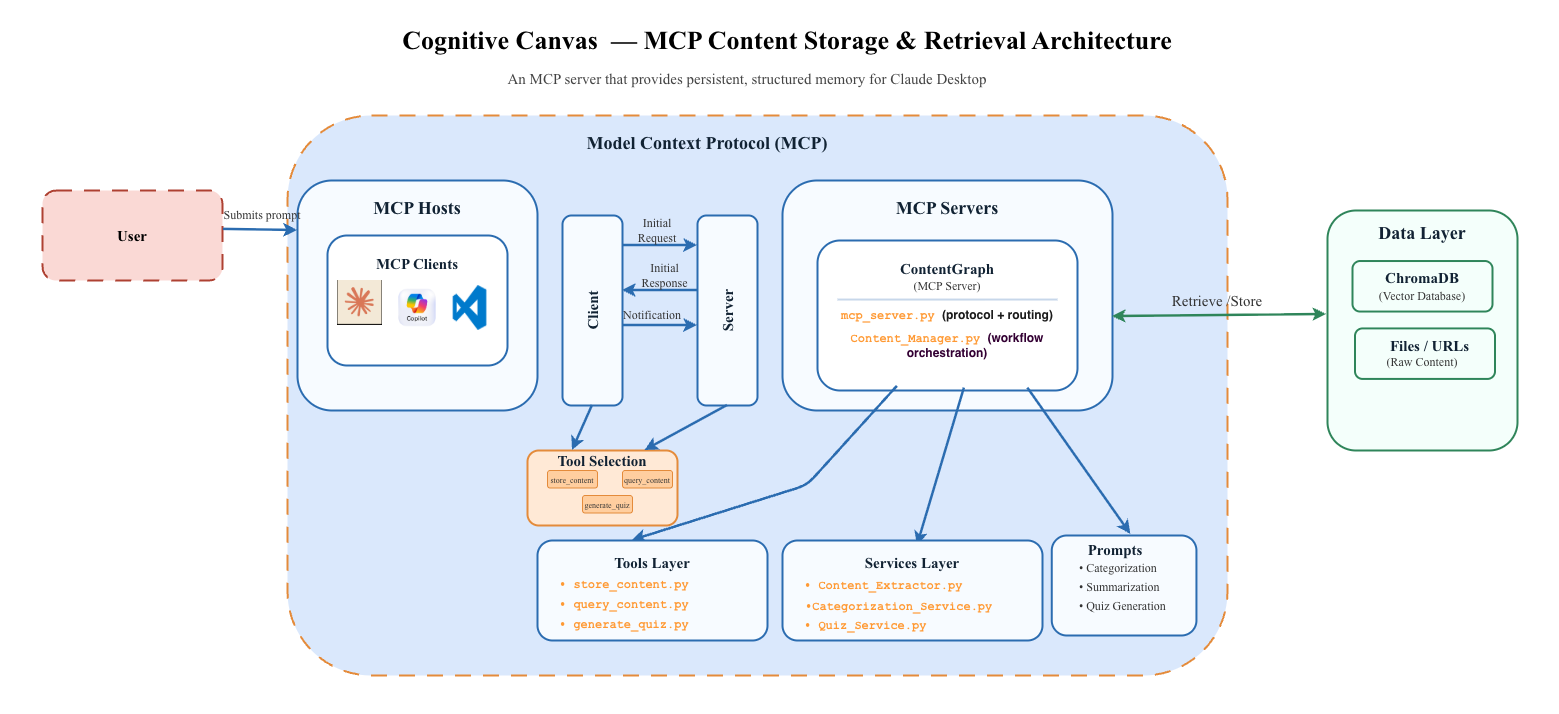
How it works: Example Workflow
- User Action: The user asks Copilot in Visual Studio Code to "Save this article about LLMs" while browsing a webpage.
- MCP Request: Copilot sends a request to the Cognitive Canvas MCP server to execute the
store_contenttool with the URL as a parameter. - Content Extraction: The server extracts the main content from the URL using BeautifulSoup4.
- Categorization: The content is categorized using GPT-4o-mini via the Instructor library.
- Storage: The content and metadata are stored in ChromaDB for semantic search and SQLite for relational data.
- Confirmation: The server returns a success message to Copilot, which is displayed in the chat interface.
Technical Implementation
The implementation consists of several key components, each responsible for a specific aspect of the system's functionality.
1. MCP Server Layer
FastMCP was utilized to bootstrap the server. The core responsibility of this layer is to define the API contract between the AI and the Python backend.
To ensure reliability, Pydantic models are used for all tool parameters. This enforces strict typing; if the AI attempts to call a tool with malformed data, the request is rejected before it reaches the business logic.
click here to see the code.
2. Content Extraction & Categorization
This service handles data ingestion:
- Extraction: Implemented using BeautifulSoup4. Custom parsing logic isolates the main article content from boilerplate HTML (navbars, footers), ensuring only high-quality data enters the database.
click here to see the code. - Categorization: OpenAI's GPT-4o-mini is integrated using the Instructor library. Instructor is critical here because it patches the OpenAI client to validate responses against Pydantic schemas, guaranteeing that the category and tags returned are always valid JSON.
click here to see the code.
3. Vector Database
ChromaDB is used to store and retrieve content based on semantic similarity. The Sentence-Transformers library generates embeddings for each article, enabling efficient vector searches.
vector_database.py encapsulates all database interactions, providing a clean interface for adding new content and querying existing entries.
click here to see the code.
4. Quiz Generation Service
To facilitate active learning, this service uses GPT-3.5-turbo to generate study materials. It takes the stored content and transforms it into structured quizzes (Multiple Choice, True/False). This demonstrates how to chain retrieval (RAG) with generative tasks.
click here to see the code.
5. Content Manager
The Content Manager orchestrates the overall workflow. It acts as a facade, coordinating between the extraction, categorization, vector database, and quiz services to fulfill user requests.
click here to see the code.
Tech Stack Summary
- Core: Python 3.11, FastMCP, Pydantic
- AI/ML: OpenAI API, Instructor, Sentence-Transformers
- Database: ChromaDB (Vector), SQLite (Relational)
- Testing: Pytest, Tenacity (for retry logic)
- Web Scraping: BeautifulSoup4, Requests